

Segmenting and ordering data
To optimize query performance, enables you to explicitly control the way your data is physically organized in the . By structuring data effectively, queries can minimize disk reads and execute more efficiently, using vectorized execution for parallel batch processing where possible.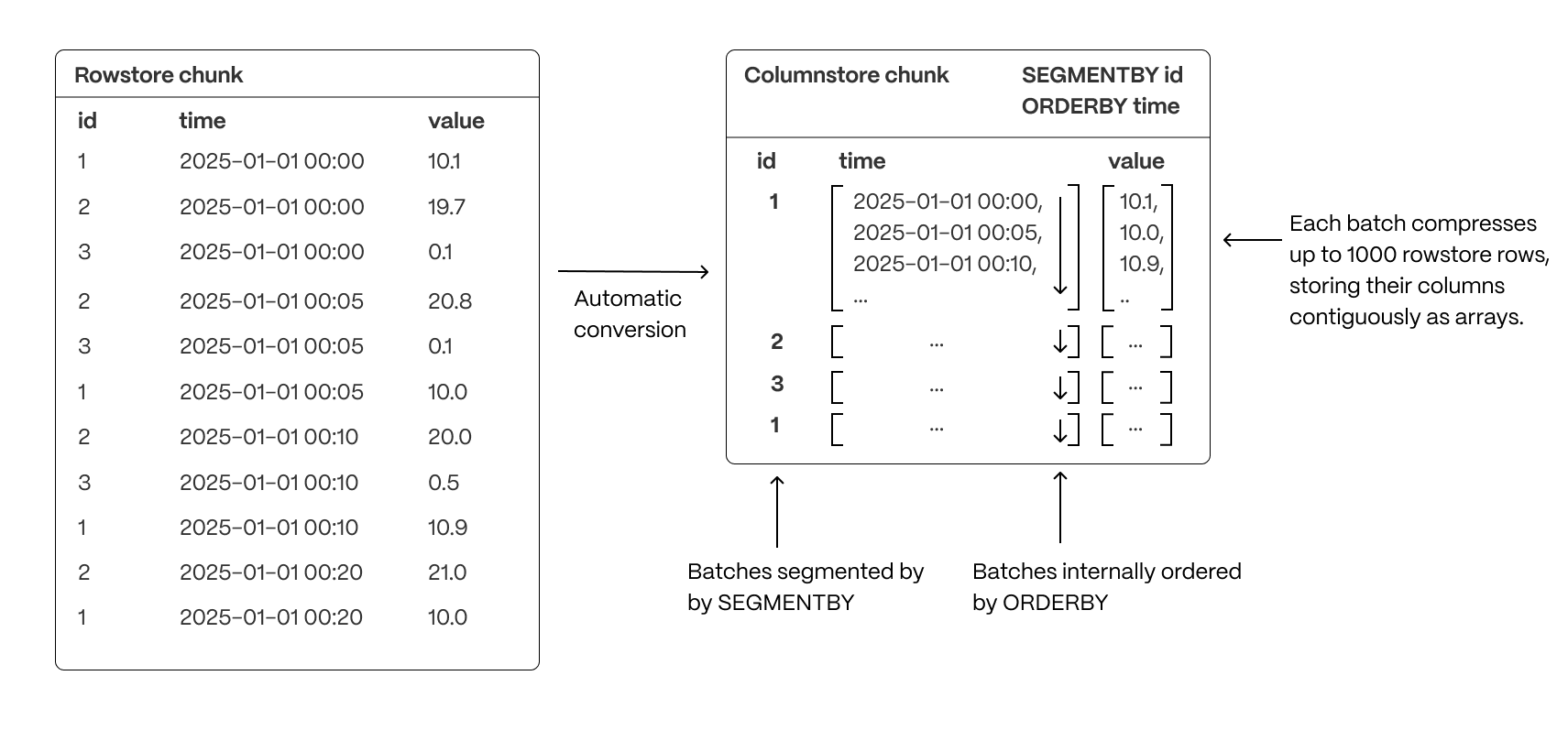
- Group related data together to improve scan efficiency: organizing rows into logical segments ensures that queries filtering by a specific value only scan relevant data sections. For example, in the above, querying for a specific ID is particularly fast.
- Sort data within segments to accelerate range queries: defining a consistent order reduces the need for post-query sorting, making time-based queries and range scans more efficient.
- Reduce disk reads and maximize vectorized execution: a well-structured storage layout enables efficient batch processing (Single Instruction, Multiple Data, or SIMD vectorization) and parallel execution, optimizing query performance.
Improve performance in the columnstore by segmenting and ordering data
Ordering data in the has a large impact on the compression ratio and performance of your queries. Rows that change over a dimension should be close to each other. As s contain time-series data, they are partitioned by time. This makes the time column a perfect candidate for ordering your data since the measurements evolve as time goes on. If you useorderby as your only columnstore setting, you get a good enough compression ratio to save a lot of
storage and your queries are faster. However, if you only use orderby, you always have to access your data using the
time dimension, then filter the rows returned on other criteria.
Accessing the data effectively depends on your use case and your queries. You segment data in the
to match the way you want to access it. That is, in a way that makes it easier for your queries to fetch the right data
at the right time. When you segment your data to access specific columns, your queries are optimized and yield even better performance.
For example, to access information about a single device with a specific device_id, you segment on the device_id column.
This enables you to run analytical queries on compressed data in the much faster.
To illustrate, run the same query on a , first without, then with optimizations:
-
Create a hypertable
Create a
metricswith the following command:When you create a usingCREATE TABLE ... WITH ..., the default partitioning column is automatically the first column with a timestamp data type. Also, creates a columnstore policy that automatically converts your data to the , after an interval equal to the value of thechunk_interval, defined throughcompress_afterin the policy. This columnar format enables fast scanning and aggregation, optimizing performance for analytical workloads while also saving significant storage space. In the conversion, s are compressed by up to 98%, and organized for efficient, large-scale queries. You can customize this policy later usingalter_job. However, to changeafterorcreated_before, the compression settings, or the the policy is acting on, you must remove the columnstore policy and add a new one. You can also manually convert s in a to the . -
Execute a query on the hypertable without optimizations
-
Query your data
Gives the following result:
-
Query your data
-
Execute a query on the same data segmented and ordered in the columnstore
-
Control the way your data is ordered and segmented in the :
-
Query your data
Gives the following result:
orderbyandsegmentbynot only reduces the amount of space taken by your data, but also vastly improves query speed. -
Control the way your data is ordered and segmented in the :