

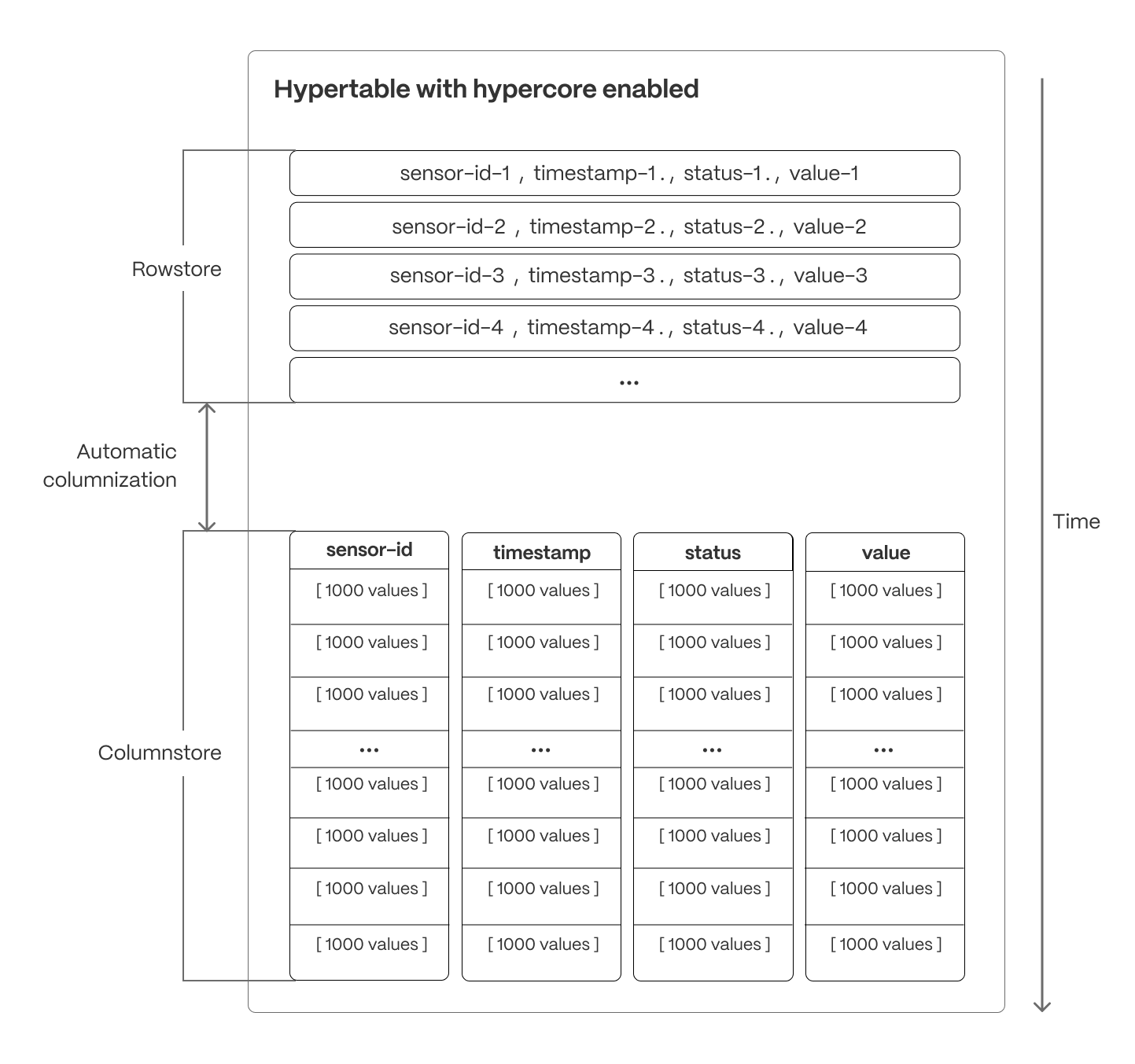
 Hypercore solves the key challenges in real-time analytics:
- High ingest throughput
- Low-latency ingestion
- Fast query performance
- Efficient handling of data updates and late-arriving data
- Streamlined data management
- Fast ingest with rowstore: new data is initially written to the rowstore, which is optimized for high-speed inserts and updates. This process ensures that real-time applications easily handle rapid streams of incoming data. Mutability—upserts, updates, and deletes happen seamlessly.
- Efficient analytics with columnstore: as the data cools and becomes more suited for analytics, it is automatically converted to the columnstore. This columnar format enables fast scanning and aggregation, optimizing performance for analytical workloads while also saving significant storage space.
- Faster queries on compressed data in columnstore: in the columnstore conversion, hypertable chunks are compressed by up to 98%, and organized for efficient, large-scale queries. Combined with chunk skipping, this helps you save on storage costs and keeps your queries operating at lightning speed.
- Fast modification of compressed data in columnstore: just use SQL to add or modify data in the columnstore. TimescaleDB is optimized for superfast INSERT and UPSERT performance.
- Full mutability with transactional semantics: regardless of where data is stored, hypercore provides full ACID support. Like in a vanilla Postgres database, inserts and updates to the rowstore and columnstore are always consistent, and available to queries as soon as they are completed.
Samples
Best practice for using hypercore is to:-
Enable columnstore on a hypertable
For efficient queries, remember to
segmentbythe column you will use most often to filter your data. For example:-
Hypertables:
Use
CREATE TABLE:For TimescaleDB v2.23.0 and higher, the table is automatically partitioned on the first column in the table with a timestamp data type. If multiple columns are suitable candidates as a partitioning column, TimescaleDB throws an error and asks for an explicit definition. For earlier versions, setpartition_columnto a time column. If you are self-hosting TimescaleDB v2.20.0 to v2.22.1, to convert your data to the columnstore after a specific time interval, you have to call add_columnstore_policy after you call CREATE TABLE If you are self-hosting TimescaleDB v2.19.3 and below, create a Postgres relational table, then convert it using create_hypertable. You then enable hypercore with a call to ALTER TABLE. - Continuous aggregates:
-
Use
ALTER MATERIALIZED VIEWfor a continuous aggregate: -
Create a columnstore_policy that automatically converts chunks in a hypertable
to the columnstore at a specific time interval. For example:
-
Hypertables:
Use
-
View the policies that you set or the policies that already exist
See timescaledb_information.jobs.
Limitations
chunks in the columnstore have the following limitations:ROW LEVEL SECURITYis not supported on chunks in the columnstore.
Available functions
Policies
add_columnstore_policy(): set a policy to automatically move chunks in a hypertable to the columnstore when they reach a given ageremove_columnstore_policy(): remove a columnstore policy from a hypertable
Configuration
ALTER TABLE (hypercore): enable the columnstore for a hypertable
Manual conversion
convert_to_columnstore(): manually add a chunk to the columnstoreconvert_to_rowstore(): move a chunk from the columnstore to the rowstore
Statistics and information
chunk_columnstore_stats(): get statistics about chunks in the columnstorehypertable_columnstore_stats(): get columnstore statistics related to the
timescaledb_information.chunk_columnstore_settings: get information about settings on each chunk in the columnstoretimescaledb_information.hypertable_columnstore_settings: get information about columnstore settings for all hypertables