

 s offer the following benefits:
- Efficient data management with automated partitioning by time: splits your data into s that hold data from a specific time range. For example, one day or one week. You can configure this range to better suit your needs.
- Better performance with strategic indexing: an index on time in the descending order is automatically created when you create a hypertable. More indexes are created on the level, to optimize performance. You can create additional indexes, including unique indexes, on the columns you need.
- Faster queries with chunk skipping: skips the s that are irrelevant in the context of your query, dramatically reducing the time and resources needed to fetch results. Even more—you can enable skipping on non-partitioning columns.
- Advanced data analysis with hyperfunctions: enables you to efficiently process, aggregate, and analyze significant volumes of data while maintaining high performance.
Inheritance is not supported for hypertables and may lead to unexpected behavior.
Partition by time
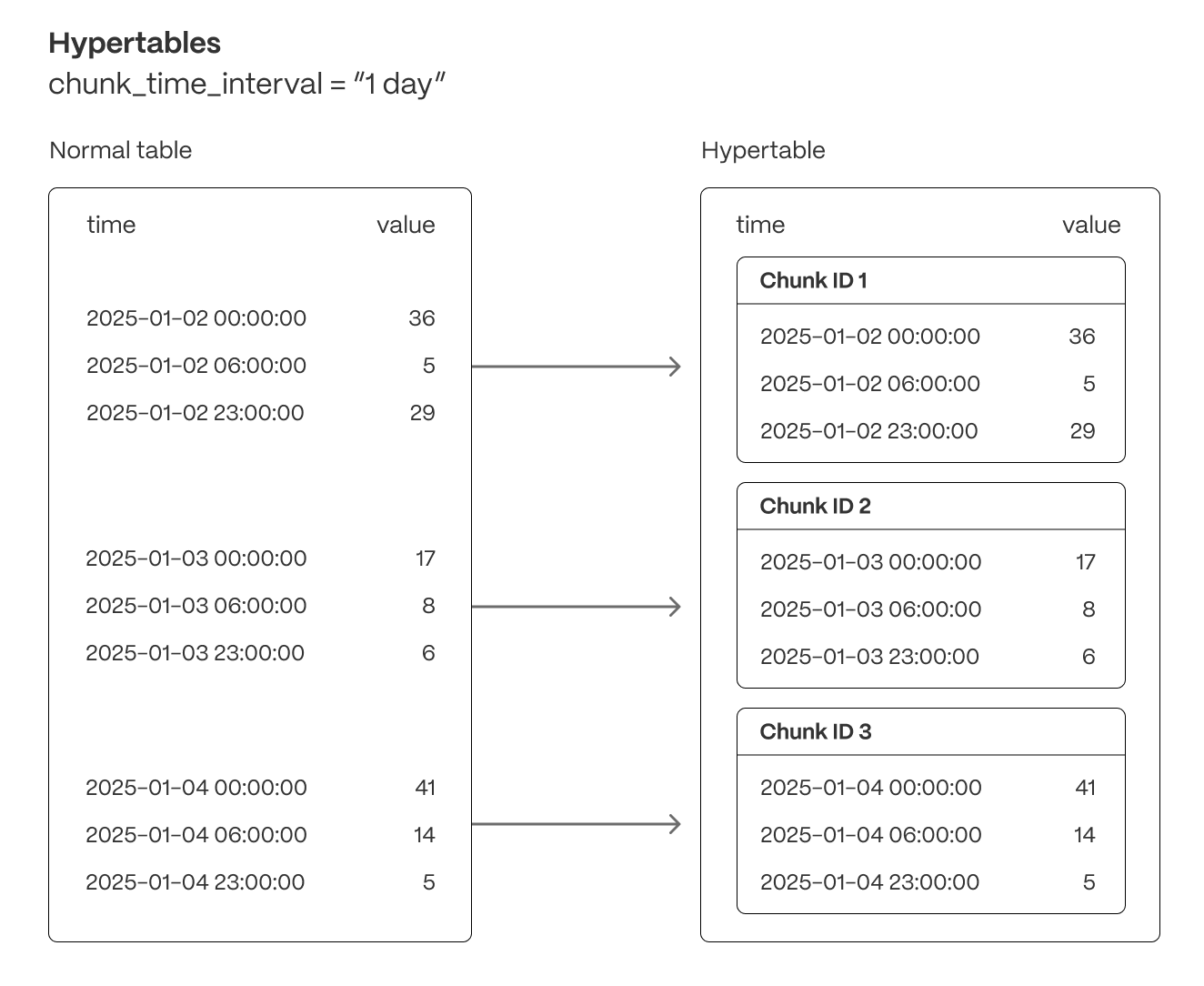
Each is partitioned into child s called chunks. Each chunk is assigned a range of time, and only contains data from that range.Time partitioning
Typically, you partition s on columns that hold time values. Best practice is to usetimestamptz column type. However, you can also partition on
date, integer, timestamp and UUIDv7 types.
By default, each chunk holds data for 7 days. You can change this to better suit your
needs. For example, if you set chunk_interval to 1 day, each chunk stores data for a single day.
divides time into potential chunk ranges, based on the chunk_interval. Each chunk holds
data for a specific time range only. When you insert data from a time range that doesn’t yet have a chunk,
automatically creates a chunk to store it.
In practice, this means that the start time of your earliest chunk does not
necessarily equal the earliest timestamp in your . Instead, there
might be a time gap between the start time and the earliest timestamp. This
doesn’t affect your usual interactions with your , but might affect
the number of chunks you see when inspecting it.
Best practices for scaling and partitioning
Best practices for maintaining a high performance when scaling include:- Limit the number of s in your ; having tens of thousands of s is not recommended.
- Choose a strategic chunk size.
chunk_interval so that prior to processing,
the indexes for chunks currently being ingested into fit within 25% of main memory. For example, on a system with 64
GB of memory, if index growth is approximately 2 GB per day, a 1-week chunk interval is appropriate. If index growth is
around 10 GB per day, use a 1-day interval.
You set chunk_interval when you create a , or by calling
set_chunk_time_interval() on an existing hypertable.
For a detailed analysis of how to optimize your chunk sizes, see the
blog post on chunk time intervals. To learn how
to view and set your chunk time intervals, see
Optimize hypertable chunk intervals.
Hypertable indexes
By default, indexes are automatically created when you create a . The default index is on time, descending. You can prevent index creation by setting thecreate_default_indexes option to false.
s have some restrictions on unique constraints and indexes. If you
want a unique index on a , it must include all the partitioning
columns for the table. To learn more, see
Enforce constraints with unique indexes on hypertables.
You can prevent index creation by setting the create_default_indexes option to false.
Partition by dimension
Partitioning on time is the most common use case for , but it may not be enough for your needs. For example, you may need to scan for the latest readings that match a certain condition without locking a critical .The use case for a partitioning dimension is a multi-tenant setup. You isolate the tenants using the
tenant_id space
partition. However, you must perform extensive testing to ensure this works as expected, and there is a strong risk of
partition explosion.set_number_partitions().
For example:
-
Create the hypertable with the 1-day interval chunk interval
-
Add a hash partition on a non-time column
Now use your as usual, but you can also ingest and query efficiently by the
device_idcolumn. -
Change the number of partitions as you data grows