

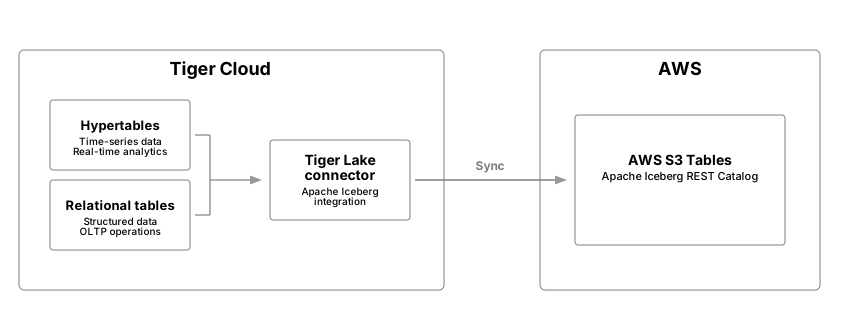
 is a native integration enabling synchronization between s and relational tables
running in s to Iceberg tables running in Amazon S3 Tables in your AWS account.
is a native integration enabling synchronization between s and relational tables
running in s to Iceberg tables running in Amazon S3 Tables in your AWS account.
Prerequisites
To follow the steps on this page:- Create a target with Real-time analytics enabled. You need your connection details.
This feature is currently not supported for on Microsoft Azure.
Integrate a data lake with your service
To connect a to your data lake:- AWS Management Console
- AWS CloudFormation CLI
- Manual configuration
-
Set the AWS region to host your table bucket
- In AWS CloudFormation, select the current AWS region at the top-right of the page.
- Set it to the Region you want to create your table bucket in.
-
Create your CloudFormation stack
-
Click
Create stack, then selectWith new resources (standard). -
In
Amazon S3 URL, paste the following URL, then clickNext.request -
In
Specify stack details, enter the following details, then clickNext:Stack Name: a name for this CloudFormation stackBucketName: a name for this S3 table bucketProjectIDandServiceID: enter the connection details for your
-
In
Configure stack optionscheckI acknowledge that AWS CloudFormation might create IAM resources, then clickNext. -
In
Review and create, clickSubmit, then wait for the deployment to complete. AWS deploys your stack and creates the S3 table bucket and IAM role. -
Click
Outputs, then copy all four outputs.
-
Click
-
Connect your to the data lake
-
In , select the you want to integrate with AWS S3 Tables, then click
Connectors. -
Select the Apache Iceberg connector and supply the:
- ARN of the S3Table bucket
- ARN of a role with permissions to write to the table bucket
-
In , select the you want to integrate with AWS S3 Tables, then click
Stream data from your service to your data lake
Records are imported in time order, from oldest to newest. Your or relational table must have a primary key, or composite primary keys as a prerequisite to sync to Iceberg. When you start syncing, all data in the table is streamed to Iceberg in the following processes:- Table snapshot: stream data from a snapshot of the source table to the destination Iceberg table at approximately 300.000 records a second. For larger tables, import speeds are approximately 1 billion records or 100 GB of data an hour. However, these numbers vary on table width and the complexity of the schema.
- Table changes: stream changes made to the source table (CDC) after the snapshot is taken to a branch of the destination Iceberg table. This happens at approximately 30.000 events a second. Ingest bursts exceeding this can be handled for a certain amount of time and feathered out over time. This depends on duration of the ingestion burst, and the amount of extra events to be handled.
tigerlake.iceberg_sync:boolean, set totrueto start streaming, orfalseto stop the stream. A stream cannot resume after being stopped.tigerlake.iceberg_partitionby: optional property to define a partition specification in Iceberg. By default the Iceberg table is partitioned asday(<time-column of {HYPERTABLE}>). This default behavior is only applicable to s. For more information, see partitioning.tigerlake.iceberg_namespace: optional property to set a namespace, the default istimescaledb.tigerlake.iceberg_table: optional property to specify a different table name. If no name is specified the table name is used.
Partitioning intervals
By default, the partition interval for an Iceberg table is one day(time-column) for a . table sync does not enable any partitioning in Iceberg for non-hypertables. You can set it using tigerlake.iceberg_partitionby. The following partition intervals and specifications are supported:
These partitions define the behavior using the Iceberg partition specification.
Sample code
The following samples show you how to tune data sync from a or a relational table to your data lake:-
Sync a with the default one-day partitioning interval on the
ts_columncolumn To start syncing data from a to your data lake using the default one-day chunk interval as the partitioning scheme to the Iceberg table, run the following statement:This is equivalent today(ts_column). -
Specify a custom partitioning scheme for a
You use the
tigerlake.iceberg_partitionbyproperty to specify a different partitioning scheme for the Iceberg table at sync start. For example, to enforce an hourly partition scheme from the chunks onts_columnon a , run the following statement: -
Set the partition to sync relational tables
relational tables do not forward a partitioning scheme to Iceberg, you must specify the partitioning scheme using
tigerlake.iceberg_partitionbywhen you start the sync. For example, for a standard table to sync to the Iceberg table with daily partitioning , run the following statement: -
Stop sync to an Iceberg table for a or a relational table
-
Update or add the partitioning scheme of an Iceberg table
To change the partitioning scheme of an Iceberg table, you specify the desired partitioning scheme using the
tigerlake.iceberg_partitionbyproperty. For example. if thesamplestable has an hourly (hour(ts)) partition on thetstimestamp column, to change to daily partitioning, call the following statement:This statement is also correct for Iceberg tables without a partitioning scheme. When you change the partition, you do not have to pause the sync to Iceberg. Apache Iceberg handles the partitioning operation in function of the internal implementation.
timescaledb namespace. To specify a different namespace when you start the sync, use the tigerlake.iceberg_namespace property. For example:
tigerlake.iceberg_table property. For example:
Limitations
- Service requires 17.6 and above is supported.
- Amazon S3 Tables Iceberg REST catalog only is supported.
- In order to collect deletes made to data in the columstore, certain columnstore optimizations are disabled for s, this includes Direct Compress.
- The
TRUNCATEstatement is not supported, and does not truncate data in the corresponding Iceberg table. - Data in a that has been moved to the low-cost object storage tier is not synced.
- Writing to the same S3 table bucket from multiple services is not supported, bucket-to-service mapping is one-to-one.
- Iceberg snapshots are pruned automatically if the amount exceeds 2500.
- A with long running continuous aggregates refresh transactions, plus 30 minutes, can cause issues with holding the replication slot too long. Please consider batching in these cases.